
For hosting companies, agencies and MSPs
cPanel & WHM: AvailablePlesk: In developmentInfraFence, inside cPanel & WHM and Plesk
Your team already manages servers from WHM and Plesk. The InfraFence plugins bring protection status, bans, malware findings, security events and per-site scans into that same screen, on every server you run.
A real cPanel & WHM server with InfraFence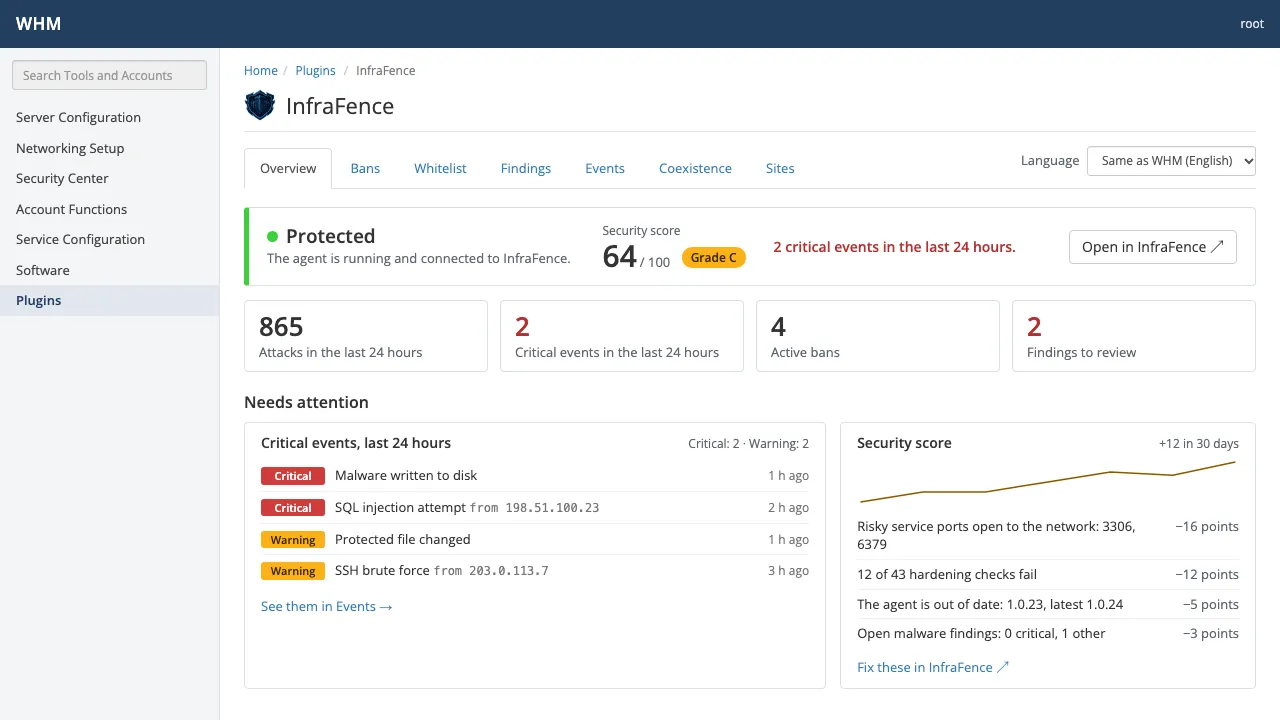
- Panels
- cPanel & WHM 11.110+ · Plesk in development
- Who can open it
- root in WHM, the administrator in Plesk
- Credentials in the panel
- None
- Price
- Included in Basic, Pro and AutoMode
What your team sees in the panel
Seven screens, the same in both panels. Each one reads from the InfraFence agent already running on that server.
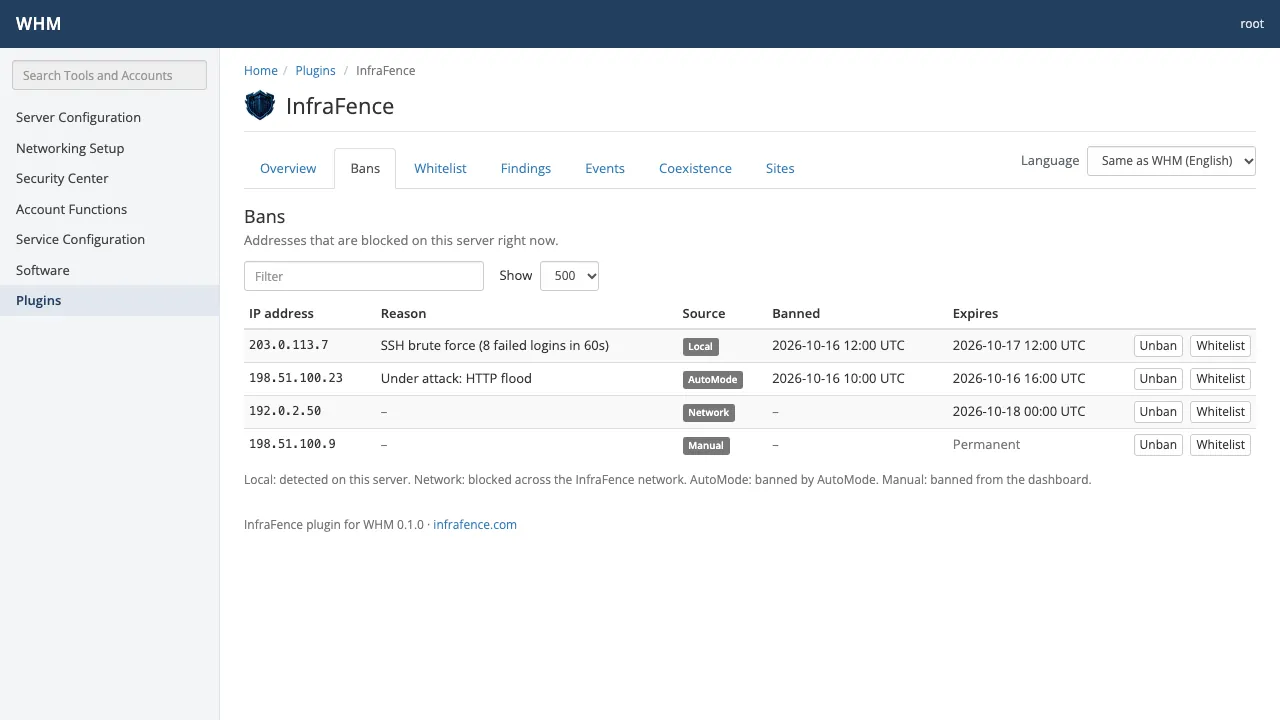
Screens rendered from the plugins with sample data.
Three steps, no keys to copy
- 01
Create your account and install the agent
Sign up, add the server in the InfraFence dashboard (Servers › Add server) and run the one-line install command as root.
- 02
Install the plugin from your dashboard
With Basic, Pro or AutoMode, Panel plugins › cPanel & WHM gives the install command: the RPM for AlmaLinux 8, 9, 10 and CloudLinux, the .deb for Ubuntu 24.04, or the tarball.
- 03
Manage from WHM
Open InfraFence in WHM. The plugin talks to the agent on the same server, so there is no API key to paste and no account to link.
Works alongside what you already run
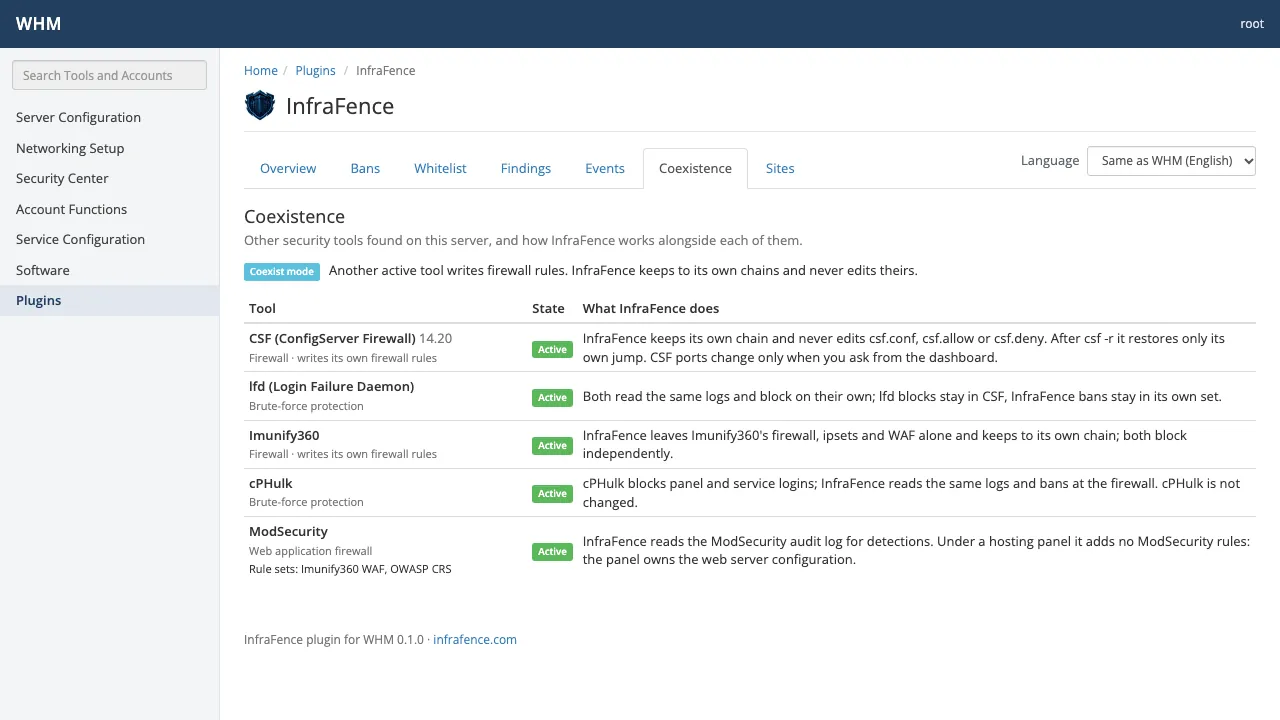
Hosting servers rarely start clean: there is a firewall, a brute-force guard, a WAF, sometimes a commercial malware scanner. The agent detects them and the plugin shows what InfraFence does next to each one.
When another tool writes firewall rules, InfraFence keeps to its own chains and never edits theirs. No fight over the firewall.
Detected on the server
- CSF/lfd
- Imunify360
- cPHulk
- fail2ban
- CrowdSec
- Plesk Firewall
- BitNinja
- Monarx
- firewalld
- ufw
ModSecurity vendors and rule sets: OWASP CRS, Comodo, Imunify, Atomicorp, cPanel vendors, Plesk WAF
A plugin you can install with root
A panel plugin sees the whole server, so it is designed to hold nothing worth stealing and to change nothing behind your back.
- No credentials in the panel
- The plugin talks to the InfraFence agent already on the server and stores no keys or tokens. Open in InfraFence is a plain link: you sign in to the dashboard as usual, with two-factor authentication.
- Root and administrator only
- The screens cover every account on the server, so only root in WHM and the administrator in Plesk can open them. Resellers and customers never see them.
- Every change confirmed
- Unban, allow, remove and scan always ask for confirmation, and the agent reports each one to the dashboard with the name of the panel user.
- Hands off the host
- The plugin never changes the firewall, ModSecurity or any other tool by itself. Uninstalling it removes the plugin only, never the agent.
- Auditable before you install
- Source-available under BSL 1.1, like the agent. Read every line on GitHub before it reaches a server.
A trust badge for your clients' sites
Agencies can show clients that their sites are monitored: each domain gets a “Monitored by InfraFence” badge and a public trust page, with your agency's name and logo on Pro and AutoMode.
Show your clients they are protectedIncluded in Basic, Pro and AutoMode
The plugins cost nothing extra on the paid plans: you pay per server, the same as for any other server. Starter does not include them. If payment stops, the plugin shows no data until the plan is active again.
Compare every plan| Plan | Monthly/server/month | Billed yearly/server/month · save 20% |
|---|---|---|
| Basic | $8.90 | $7.12 |
| Pro | $18.90 | $15.12 |
| AutoMode | $28.90 | $23.12 |
Prices in USD. Customers in the euro area are billed in EUR at the same amounts.
Questions from hosting teams
Does the plugin need an API key or a login?
No. It talks only to the InfraFence agent on the same server and stores no keys or tokens. To open the full dashboard you sign in there as usual.
Can resellers or customers see it?
No. The screens show data for every account on the server, so the plugin is for root in WHM and the administrator in Plesk only.
We already run CSF, Imunify360 or the Plesk Firewall. Will they conflict?
No. The agent detects them and works next to them. When another tool writes firewall rules, InfraFence keeps to its own chains and never edits theirs.
What does Unban do from the panel?
It lifts the ban on that server only. The ban stays in the dashboard and on your other servers, and the plugin says so before you confirm.
Do the plugins cost extra?
Not on the paid plans: they are included in Basic, Pro and AutoMode, and you pay per server, as you would without the plugin. Starter does not include them. If payment stops, the plugin shows no data from the 72-hour stop until the plan is active again.
Which systems are supported?
For cPanel & WHM 11.110 or later, an RPM for AlmaLinux 8, 9, 10 and CloudLinux and a .deb for Ubuntu 24.04. The Plesk extension, for Plesk Obsidian 18.0.60 or later, is in development.
Where do we download the plugin?
From your InfraFence dashboard, on Basic, Pro or AutoMode: add the server, then Panel plugins gives the install command for your system. The packages are not a public download.
What happens if we remove the plugin?
Only the plugin is removed. The agent keeps protecting the server and reporting to the dashboard.
Protect the servers behind your panels
cPanel & WHM: AvailablePlesk: In developmentCreate your account and add the server, then install the WHM plugin from your dashboard with Basic, Pro or AutoMode. Every new account starts with 14 days of AutoMode free, no card.
The Plesk extension is in development: write to info@infrafence.com if you want to try it.