
Securing a cPanel & WHM server with InfraFence: a real case
Last updated:
A cPanel & WHM server carries many sites at once, and with them SSH, panel logins, mail, FTP and databases, all facing the internet. The protection is usually a patchwork: CSF for the firewall, cPHulk for logins, ModSecurity for the web, a malware scanner, each with its own screen, and nothing that shows the whole server, let alone all of them.
InfraFence adds one agent per server and a plugin inside WHM: root sees the security score, the critical events, the attacks and their origin, bans and malware findings without leaving WHM, and every server sits in one dashboard. Below is what it did on one of our own production cPanel servers in its first 24 hours.
A real server: the first 24 hours
A real case, anonymised: one of our own production cPanel & WHM servers, run by the company behind InfraFence, on 24 and 25 October 2026. The figures are what this server showed, in our case; another server will show different ones.
- System
- AlmaLinux 8.10, cPanel & WHM 138
- Accounts and sites
- 5 cPanel accounts, 19 sites
- Already on the server
- cPHulk, fail2ban, ModSecurity and ImunifyAV
- First 24 hours
- About 285 attacks, about 98% of them port scans
- Install, in minutes. The agent and then the WHM plugin. The agent found cPHulk, fail2ban, ModSecurity and ImunifyAV and worked next to them: nothing was restarted and no service was touched during the install.
- The first 10 minutes. The first port scanners were banned.
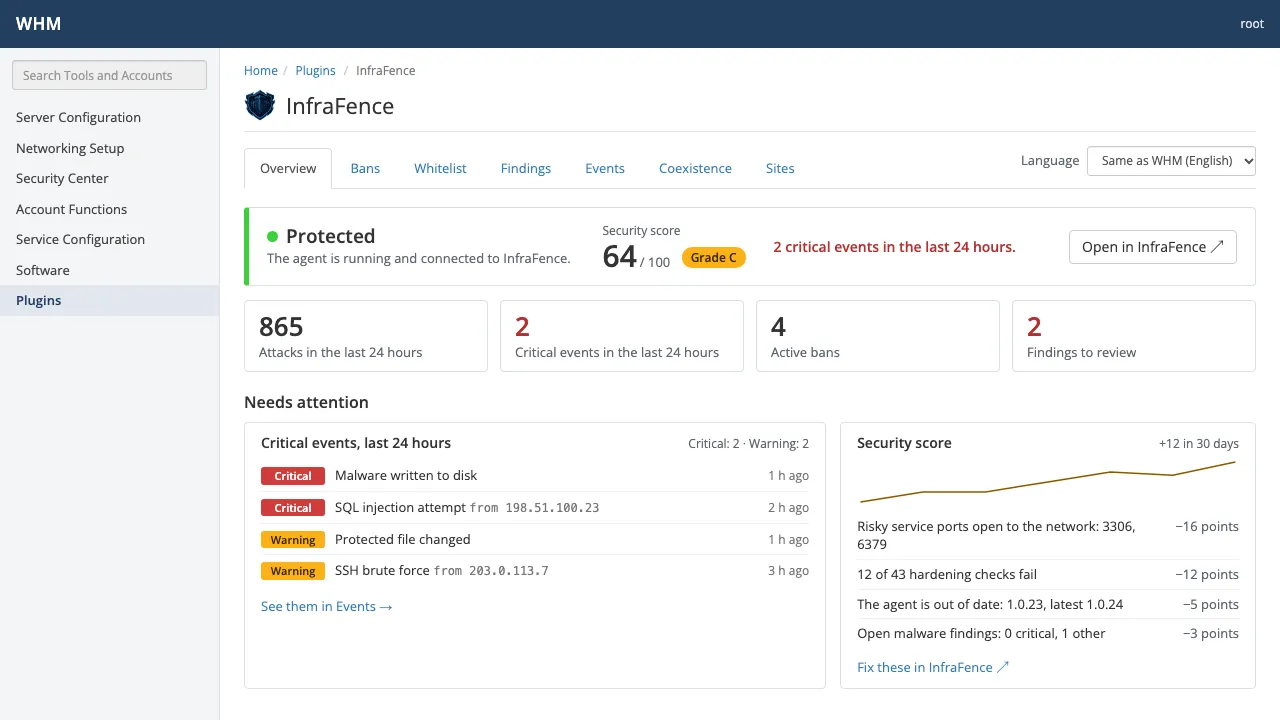
- The first check. 26 of the 50 hardening checks had something to fix, and the security score was 74 out of 100, grade C.
- A critical event: Database reachable from the internet. MySQL's port 3306 answered from the whole internet. We closed it from the dashboard: the port was closed in under 2 seconds, then the agent checked that SSH and all 19 sites still answered, and they did. The event now shows as Resolved.
- A file change. The file-integrity watch reported a change to
/root/.ssh/authorized_keys: an administrator had removed an old key. The analysis rated it low risk, keys removed rather than added, and we marked it as expected. - After 24 hours. About 285 attacks seen, about 98% of them port scans, mostly from France and Canada. At one point 91 addresses were banned at once.
In WHM, root sees the same day on the plugin's Overview: the score and its grade, the critical events of the last 24 hours, what takes points off the score, and a map of where the attacks came from. Open in InfraFence leads to the server's page in the dashboard, where the port was closed.
What root sees in WHM
The plugin lives under WHM » Plugins » InfraFence. These screenshots are rendered from the plugin with sample data, not taken from the server above.
Bans
Every banned address with its reason and source. Unban it on this server only, or add it to the whitelist.
cPanel & WHM · Bans 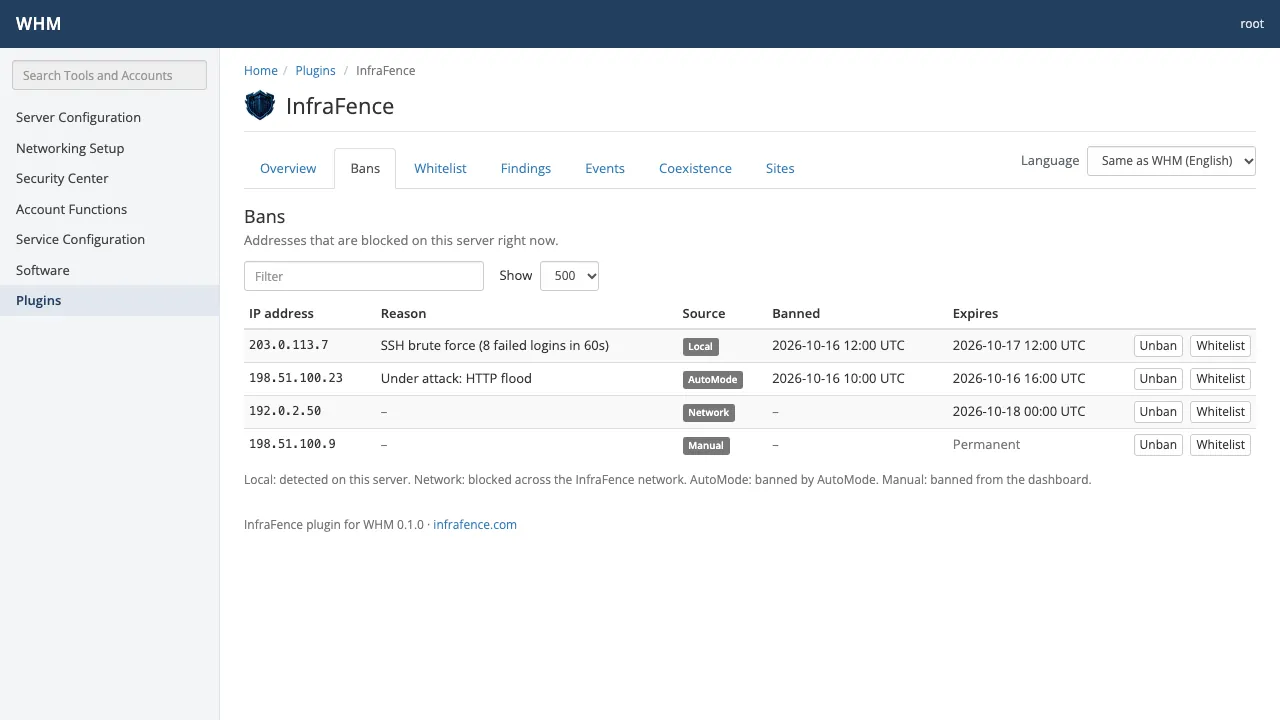
Events
Recent security events: what happened, how serious it is and where it came from.
cPanel & WHM · Events 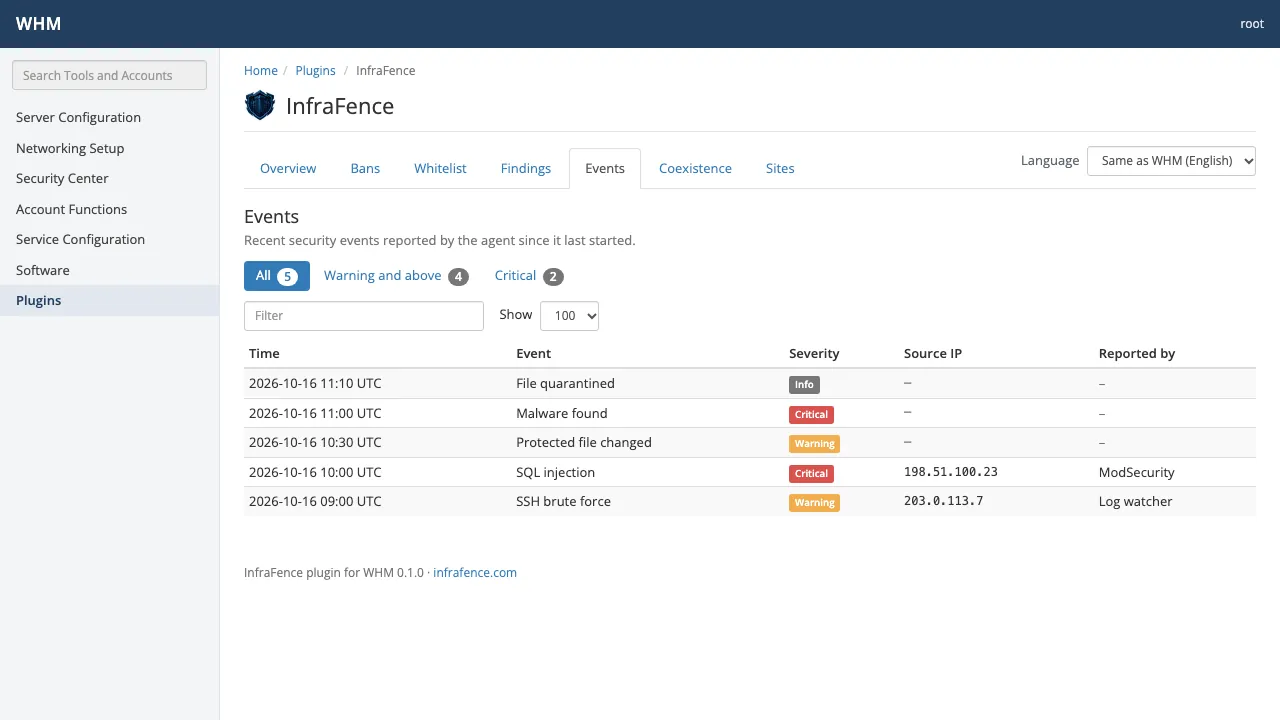
Findings
Malware and file-integrity findings on the server, with severity and status.
cPanel & WHM · Findings 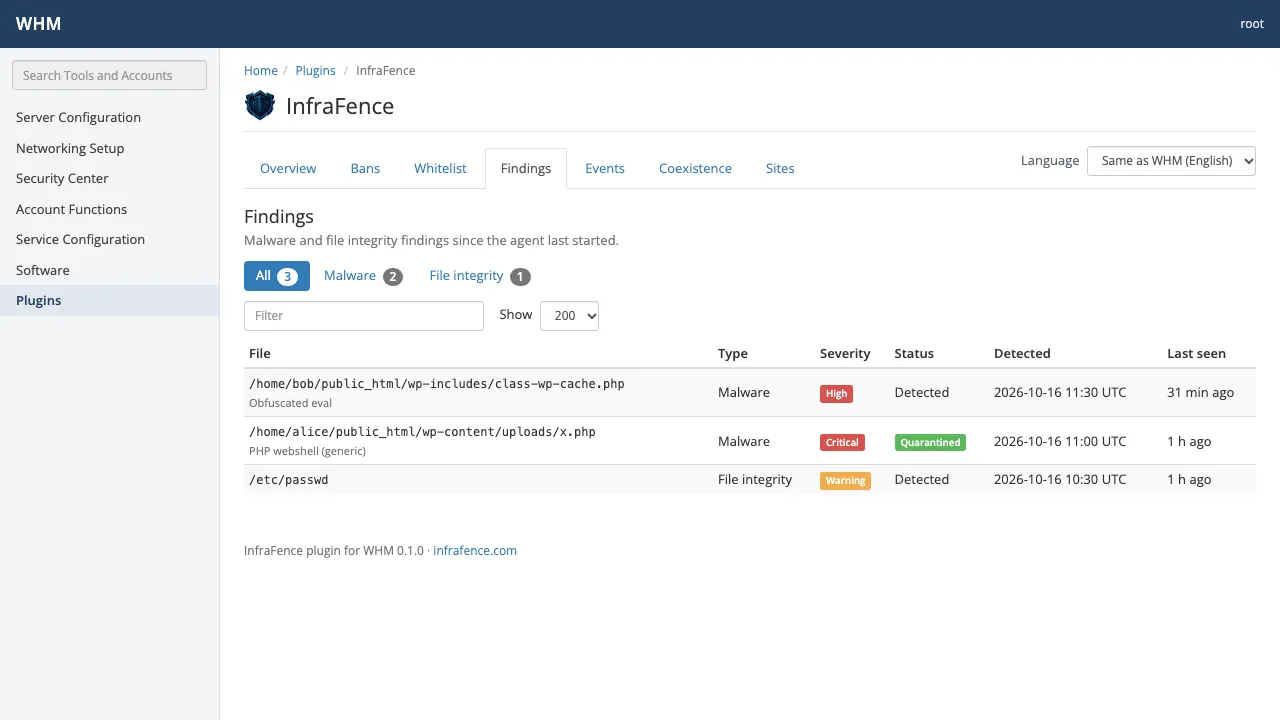
Sites and domains
Every account's domains and document roots, whether the scheduled malware scan covers them, and Scan now for a single site.
cPanel & WHM · Sites and domains 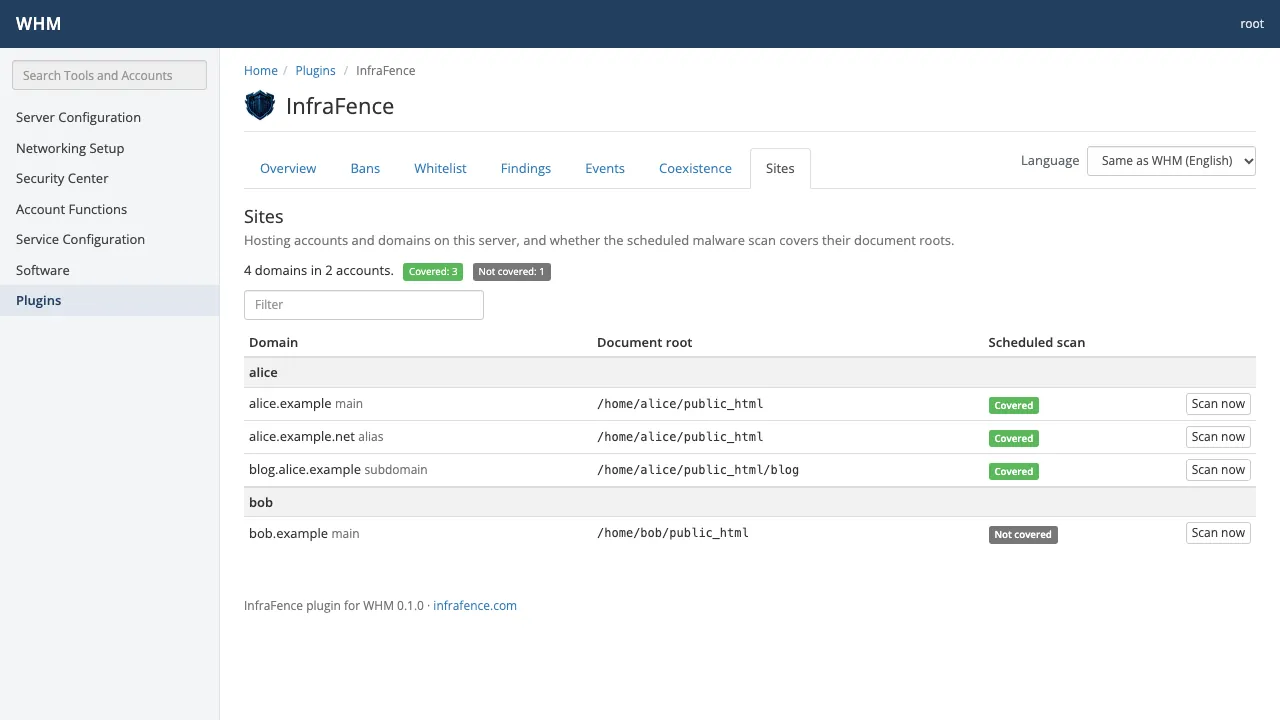
Coexistence
The other security tools found on the server, and what InfraFence does next to each one.
cPanel & WHM · Coexistence 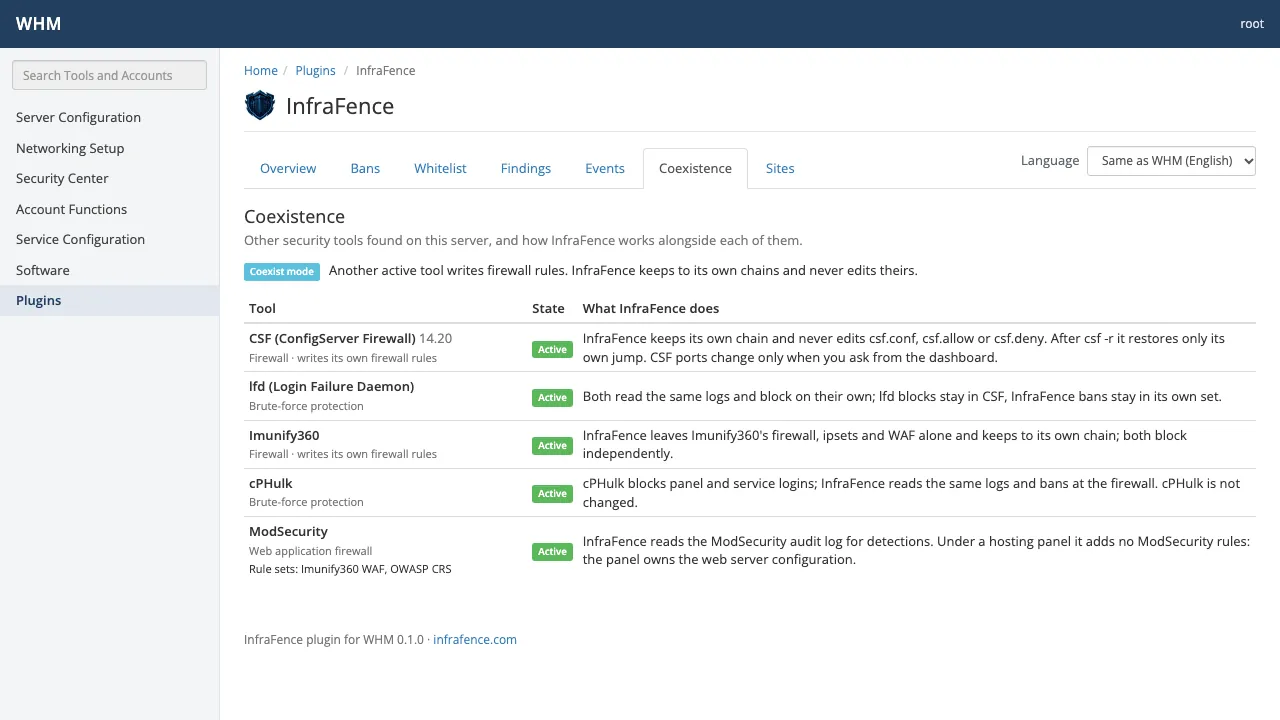
Every screen and its options are in the WHM plugin guide; the cPanel & WHM integration page explains how the plugin talks to the agent.
Next to CSF, cPHulk and Imunify, without touching cPanel
- cPanel's configuration stays cPanel's. The agent keeps to its own firewall chains. It never edits
csf.conf,csf.alloworcsf.deny, adds no ModSecurity rules under cPanel, leaves cPHulk unchanged, and leaves Imunify360's firewall, address sets and web firewall alone. - Root only. The plugin shows every account on the server, so only root sees it. Resellers and cPanel users never do.
- No credentials in the panel. The plugin stores no InfraFence key or token: it asks the agent on the same server, over a local socket only root can open.
- Every change confirmed and recorded. Unban, allow and scan ask for confirmation, and each one reaches the dashboard as an event with the name of the WHM user.
- Changes checked, or undone. When a port is closed or a fix applied, the agent checks SSH and your sites afterwards and rolls the change back by itself if something stopped answering.
Details for each tool are in Coexistence.
InfraFence, CSF, Imunify360 and fail2ban
InfraFence is not the only security product inside WHM: Imunify360 has a full WHM integration, CSF has its WHM page, and BitNinja and CrowdSec have WHM plugins too. General Linux tools such as fail2ban, Wazuh or OSSEC do not come with a WHM plugin. What InfraFence brings is a full security view inside WHM and one dashboard for all your servers, at a flat price per server.
| InfraFence | CSF | Imunify360 | fail2ban | |
|---|---|---|---|---|
| Inside WHM | Plugin for root: score, critical events, attack map, bans, findings, per-site malware scan, coexistence | Its firewall's configuration page | Full integration, with screens for cPanel users too | No WHM plugin |
| What it covers | Brute force, web firewall, bots, malware, file integrity, outbound and DNS, hardening | Firewall, and login failures through lfd | Firewall, web firewall, malware scanner with cleanup, PHP protection | Bans from log patterns |
| PHP protection at run time | Not offered | No | Proactive Defense | No |
| Many servers | One live dashboard for every server | Per server; cluster settings can share blocks | Managed in each server's panel; a dashboard can show several servers | None built in |
| Fixes | Hardening fixes and closed ports, checked and rolled back if SSH or a site breaks | By hand | Hardening features of the suite | Not covered |
| Automatic response | AutoMode: safe fixes by itself, approval for anything risky | lfd blocks | Automatic blocking and malware cleanup | Bans |
| Price per server | The same whatever the number of accounts: $8.90, $18.90 or $28.90 per month | Free (GPLv3); ConfigServer stopped development on 31 August 2025, cPanel maintains a fork | By number of accounts: $12, $25, $35 or $45 per month | Free (GPLv2) |
As of October 2026, from the vendors' public documentation and pricing pages. Prices change: check them before you decide. Each comparison in full: CSF, Imunify360, fail2ban.
Where Imunify360 is stronger. Proactive Defense watches PHP scripts as they run, which InfraFence does not do, and Imunify360 is built by the CloudLinux team and fits cPanel and CloudLinux closely, with screens for hosting customers and automatic malware cleanup. If you sell shared hosting, keep it: InfraFence runs next to it.
Price and how to start
The WHM plugin is included in the paid plans, at no extra cost: Basic $8.90, Pro $18.90 and AutoMode $28.90 per server per month, 20% less billed yearly, the same for 1 account or 300. Starter, free for one server, does not include the plugin. Every new account starts with 14 days of AutoMode free, no card. See Pricing.
- Create your account and add the server: Servers › Add server gives a one-line install command to run as root. It checks the server before it changes anything.
- In the dashboard, Panel plugins › cPanel & WHM gives the plugin's install command: the RPM for AlmaLinux 8, 9 and 10, CloudLinux and Rocky, the .deb for Ubuntu 24.04, or the tarball. cPanel & WHM 11.110 or later.
- Open WHM » Plugins » InfraFence.
More for hosting teams on the hosting page.
Questions about InfraFence on cPanel & WHM
- Do I have to remove CSF, cPHulk or Imunify360?
- No. InfraFence detects them and keeps to its own firewall chains: it never edits CSF's files, leaves cPHulk unchanged and leaves Imunify360's firewall and web firewall alone. Both block independently.
- Does the plugin change cPanel's configuration?
- No. The plugin changes nothing by itself: every action goes through the agent, which never edits configuration that cPanel manages and, under cPanel, adds no ModSecurity rules.
- Who can open the plugin?
- Only root in WHM. It shows every account on the server, so resellers and cPanel users never see it.
- How much does it cost on a server with many accounts?
- The same as on a server with one: $8.90, $18.90 or $28.90 per server per month on Basic, Pro or AutoMode, whatever the number of accounts or sites. Starter does not include the plugin.
- Is closing a port from the dashboard safe?
- Only database and admin ports such as MySQL's 3306 can be closed; SSH, 80, 443 and any port a web server uses never are. After the change the agent checks SSH and your sites, and rolls it back by itself if something stopped answering.
- Can I try it without a card?
- Yes. Every new account starts with 14 days of AutoMode free, no card, and AutoMode includes the WHM plugin. Then you choose a plan, or the account moves to Starter, which does not include the plugin.
Put InfraFence on your cPanel servers
Create your account, add the server, then install the WHM plugin from your dashboard. 14 days of AutoMode free, no card.